Why You Need a Dedicated Crochet Pattern Editor
Let's talk about how you're writing patterns right now
Be honest. You're writing your patterns in Google Docs, aren't you? Or Word. Or maybe the Notes app on your phone at 2am because you just crocheted something fire and you need to get it down before you forget. Maybe you got fancy and moved to Canva because "it looks pretty." Maybe you're in a spreadsheet. A spreadsheet! For a crochet pattern! Look, I'm not judging. I was there too. I've typed patterns into every tool that was never designed for patterns. And every single time, it's the same story: it kinda works until it absolutely doesn't.
The pain — you know it, I know it
Here's the thing about using a general-purpose tool for crochet patterns: it does not care about your stitches. At all. Google Docs doesn't know what a single crochet is. Word doesn't check if your stitch counts add up. Canva makes your pattern look gorgeous but good luck editing round 12 without rebuilding half the layout. And spreadsheets... spreadsheets make your pattern look like a tax return. None of these tools understand the structure of a crochet pattern. So all the stuff that actually makes pattern writing painful? You're doing it yourself. Manually. Every. Single. Time:
- Counting stitches by hand. You wrote 24 stitches in round 7 and now you need to make sure round 8 uses exactly 24. So you count. And recount. And lose your place. And count again. And this happens for every single round of your pattern.
- Renumbering rounds when you insert one. You realize you need an extra round between round 5 and round 6? Cool. Now renumber round 6 to 7, round 7 to 8, round 8 to 9... all the way down. Hope you didn't miss one. Narrator: you missed one.
- Checking if stitches actually add up. Your round says [sc, inc] x 6 and claims 18 stitches. Does it? Probably. But you better double check because if it's wrong, your testers will absolutely find it and roast you in the group chat.
- Writing the same pattern multiple times for different terminologies. You wrote it in US terms. Now someone wants UK terms. So you open a second doc and manually swap every "sc" for "dc" and every "dc" for "tr." Miss one and your reader is making a blanket when they wanted a beanie.
- Copy-paste formatting nightmares. You wrote the pattern in Docs, now you want to put it in Canva or on your website. Copy, paste, watch every bit of formatting explode. Spend the next hour fixing it. Rinse and repeat for every platform.
A dedicated editor fixes all of this. Like, literally all of it.
That's not hyperbole. A tool built specifically for crochet patterns understands what a round is. It knows what an increase does to a stitch count. It knows that round 6 comes after round 5 and that if you insert a new round between them, everything after it needs to shift. It knows because it was built for exactly this job and nothing else. Here's what changes when you stop fighting a general-purpose tool and use something that actually gets crochet:
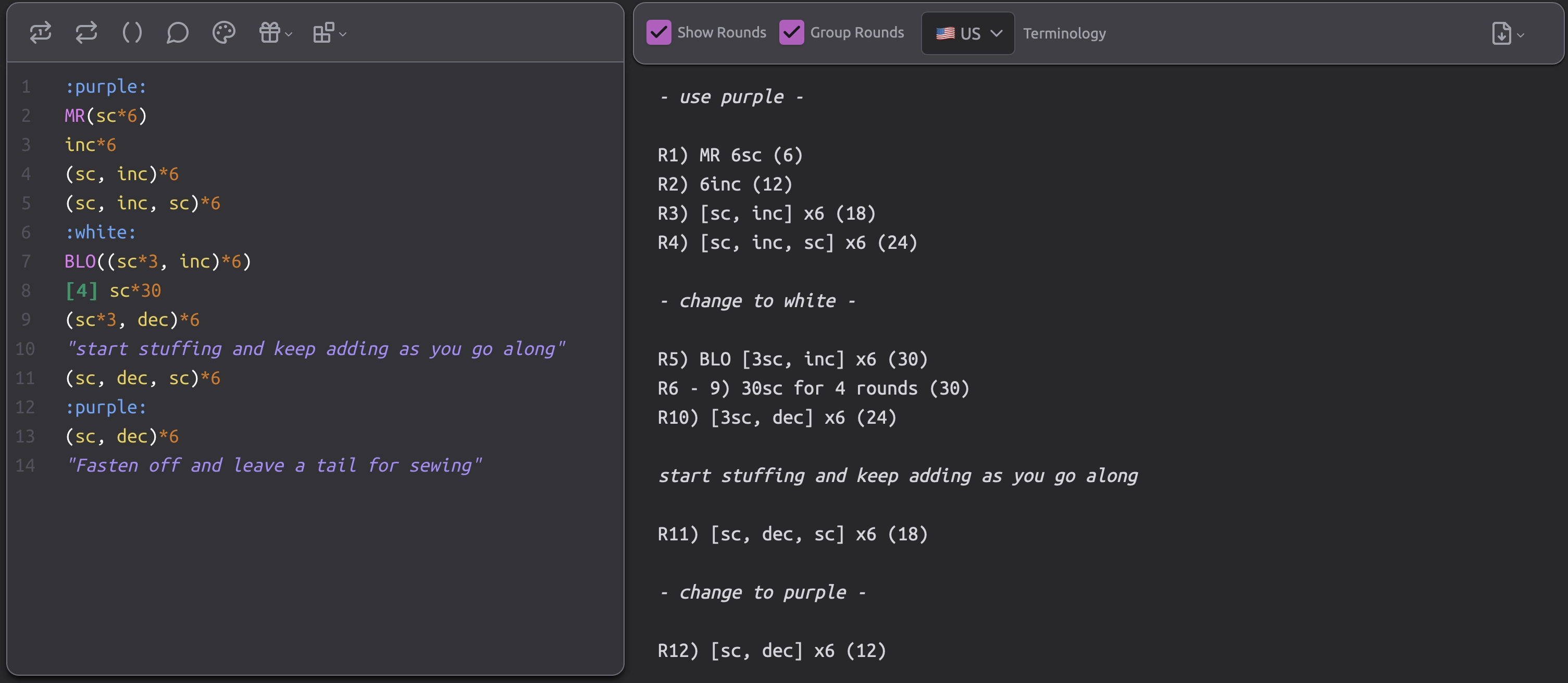
- Stitch counts happen automatically. You type your stitches, the editor adds them up. No counting. No recounting. No "wait, was that 18 or 19?" It just knows. And it's right. Every time.
- Round numbers update themselves. Insert a round? Every round after it renumbers instantly. Delete one? Same thing. You never manually adjust a round number again. That entire category of work just vanishes.
- Stitch validation catches your mistakes before your testers do. The editor checks whether each round actually accounts for every stitch from the previous round. If something doesn't add up, you know immediately — not three rounds later when your shape starts looking like it went through a dryer.
- Terminology translation is a button press. Write your pattern once in US terms. Export in UK. Or German. No second document, no manual swapping, no "oops I left one sc in the UK version." One pattern, multiple outputs. Done.
- Export to whatever format you need. PDF for Ravelry or Etsy. Markdown for your blog. Printable handout for a craft fair. You wrote the pattern once. The editor handles the rest.
"But I've been using Google Docs forever and it's fine"
I hear you. And look, it's not like you can't write a pattern in Google Docs. You absolutely can. People have been doing it for years. People also used to navigate with paper maps and they got where they were going — that doesn't mean GPS isn't better. The question isn't "can I do this without a dedicated editor?" It's "how much time am I wasting doing it the hard way?" Every hour you spend manually counting stitches, renumbering rounds, and reformatting for different platforms is an hour you could've spent designing your next piece. Or, you know, actually crocheting. Remember crocheting? That thing we all got into this for?
What about Canva?
Canva is brilliant at one thing: making your pattern look pretty for a listing or a social post. And that matters. But Canva is a layout tool, not a pattern tool. It doesn't know what a stitch count is. It can't validate your rounds. It can't auto-number anything. If you need to change round 4, you're editing text boxes and praying nothing shifts. The move is: write your pattern in a dedicated editor where the structure is solid and the math is checked, then export it and drop it into Canva for the final visual polish. Best of both worlds. Design tool does design, pattern tool does pattern. Everybody's happy.
What about spreadsheets?
I love that spreadsheet girlies exist. You're organized. You're resourceful. You made Excel do things it was never supposed to do. I respect that deeply. But a spreadsheet pattern is fragile. One misplaced row, one off-by-one in a formula, one "I accidentally deleted column B" moment and you're rebuilding from memory. Spreadsheets are great for budgets and meal planning — not so much for [sc, inc] x 6 (18).
The real flex: spend your energy on the creative stuff
Writing crochet patterns should not be this hard. The creative work — designing your amigurumi, choosing the shapes, nailing the proportions, picking the perfect yarn — that's the good stuff. That's why you're here. The stitch counting, the renumbering, the reformatting, the manual terminology swaps — that's not creative work. That's chores. And chores should be automated. A dedicated crochet pattern editor doesn't replace your creativity. It takes all the tedious mechanical stuff off your hands so you can pour your actual brain energy into the parts that matter. You design, the editor handles the rest.
Try it. Seriously. It's free.
The hard frogg's life crochet pattern editor was built for exactly this — by a pattern designer who got tired of fighting Google Docs. Auto stitch counts, auto round numbers, stitch validation, multi-terminology exports, and your own lil' froggy design buddy keeping everything in check. No more spreadsheets. No more renumbering nightmares. Just your pattern, done right.New to pattern writing? Start with our guide on how to write crochet patterns first. Already got a pattern and want testers? Check out what pattern tests are and how to run them.

Related Guides
- How to Design Your Own AmigurumiLove crocheting Amigurumi, but finally want to be able to design your very own plushie pieces? This guide is for you!
- How to Write Crochet PatternsReady to turn your crochet creations into actual patterns other people can follow? Here's how to write crochet patterns that make sense!
- What Are Crochet Pattern Tests?You've written a crochet pattern — amazing! But before you share it with the world, you need pattern testers. Here's why and how.
- US vs UK Crochet TerminologyUS and UK crochet terms use the same words for different stitches. Here's the complete side-by-side translation guide.
- Exporting Crochet Patterns as MarkdownYour pattern lives in the editor — markdown is just one export format. Here's why it's the perfect choice for embedding patterns on blogs and websites.
- Pattern Editor User DocumentationNot sure where to start on your crochet pattern editor journey? Peep some of the user documentation and become a master in no time.